
API – data description
Connecting to the application backend
To connect to the application backend, you need to provide a token.
URL: https://api.goodloading.com/api/external/calculation
POST
Request
Request Headers
| Name | Value | Required | Description |
|---|---|---|---|
| Authorization | Bearer {access_token} | Yes | Authorization key |
| Content-type | application/json | Yes |
Request Body
| Field | Type | Required | Value |
|---|---|---|---|
| name | string | No | Project name |
| note | string | No | Project description |
| loads | array of Loads | Yes | Array of loads |
| loadingSpaces | array of Loading Spaces | Yes | Array of loading spaces |
| options | json | Yes | Algorithm options |
Algorithm options (options)
| Field | Type | Required | Value |
|---|---|---|---|
| allowOverweight | boolean | No | Setting this to true allows loads to be placed in the loading space even when their combined weight exceeds its permitted payload capacity. Default value: false. |
| unit | string | No | Units for the supplied dimensions. You can choose one of two values: – cm – lb Default value: “cm” |
| keepLoadsTogether | boolean | No | Setting this to true causes loads belonging to the same group to be placed together. Default value: false. |
| newAlgorithm | boolean | No | Setting this to true makes the new algorithm be used. Default value: true. |
| loadingOrder | string | No | Values: “default”: based on the order in which load objects were added “weight”: based on load weight “volume”: based on load volume “priority”: based on load priority “barrier”: based on the order ID of the loads, separated by barriers |
| multiStops | boolean | No | Setting this to false means the multi-stop feature is no longer taken into account. Default value: false. |
| arrangeOptimally | boolean | No | Enabling the “arrange optimally” feature makes the algorithm look for an arrangement that leaves as much free space as possible, regardless of the order in which the loads were added. Default value: false. |
Load data (loads)
| Name | Value | Required | Description |
|---|---|---|---|
| id | number | No | Load ID |
| quantity | integer | Yes | Number of loads. Must be an integer greater than 0. |
| name | string | Yes | Load name |
| length | number | Yes | Length of a single load. Must be greater than 0. Applies only to cuboids and pipes. |
| width | number | Yes | Width of a single load. Must be greater than 0. Applies only to cuboids. |
| height | number | Yes | Height of a single load. Must be greater than 0. Applies only to cuboids and barrels. |
| diameter | number | Yes | Diameter of the load. Must be greater than zero. Applies only to pipes and barrels. |
| weight | number | Yes | Weight of a single load. Must be greater than or equal to 0. |
| priority | integer | No | Load priority. The value must be an integer greater than or equal to 0. Default value: 0. |
| stacking | boolean / integer | No | Load stacking. A value of false means the load is not stackable; a value of true means it is stackable. Providing an integer greater than 0 means the load is stackable up to that limited number of tiers. Default value: true. |
| allowToRotate | boolean | No | Accepts true or false. Setting it to true lets the calculation swap width and length, i.e. rotate the load around its base. Applies to: cuboids and pipes. Default value: true. |
| rotateFreely | boolean | No | Accepts true or false. Setting this value allows the load to be rotated in any direction. Applies only to cuboids. Default value: false. |
| color | string | No | Load color as a hexadecimal value (hex code). |
| origin | {id: number, name: string} |
No | Pickup location of the load (multi stops) |
| destination | {id: number, name: string} |
No | Applies to the multi-stop feature and indicates the unloading location. |
| pctSupport | number | No | Percentage of the load’s base area that is supported. Allows a load with a larger base area to be stacked on top of a load with a smaller base area. |
| alongFloor | boolean | No | Setting this to true means loads will be arranged along the floor before they are stacked. Accepts true or false. |
| maxWeightOnTop | number | No | Maximum weight that can be placed on top of the load. |
| boxesBelowAllowed | array of numbers | No | Array of box IDs that may be placed beneath the load being added. |
| loadType | number | No | 0: cuboid load, 1: barrel, 2: pipe Default “0” |
| order | number | No | Order ID of the load (only taken into account when options.loadingOrder = “barrier”) |
Loading space data (loadingSpace)
| Name | Value | Required | Description |
|---|---|---|---|
| quantity | integer | Yes | Number of loading spaces. Must be an integer greater than 0 |
| name | string | Yes | Loading space name |
| type | string | No | Type of loading space. You can set one of the following values: – vehicle [default] – sea – air x – air y – pallet |
| parts | array | Yes | Array of loading space parts. For example, a road train will have two parts. |
| part.length | number | Yes | Length of the loading space part. Must be greater than 0. |
| part.width | number | Yes | Width of the loading space part. Must be greater than 0. |
| part.height | number | Yes | Height of the loading space part. Must be greater than 0. |
| part.baseHeight | number | No | Height of the pallet base |
| part.limit | number | Yes | Partial payload capacity of the loading space. Must be greater than 0 |
| part.axis | array | No | Array of loading space axles. If provided, it must contain exactly two or three elements. |
| part.axi.distanceFromSpaceFront | number | Yes | Distance of the axle from the front of the loading space; a negative value indicates the axle is located under the driver’s cab. |
| part.axi.emptySpaceLoad | number | Yes | Axle load when the loading space is empty. The value must be a number greater than or equal to 0. |
| part.axi.maxLoad | number | Yes | Highest permitted axle load. The value must be a number greater than or equal to 0. |
| part.loadingSide | string | No | How the loading space is loaded. You can set one of four values: “back” [default] “top” “left” “right” |
| part.barrier | object | No | A barrier within the loading space between rows of loads (only taken into account when options.loadingOrder = “barrier”). |
| part.barrier.thickness | number | Yes | Barrier thickness |
| part.barrier.height | number | No | Barrier height |
| stops | array | No | Series of stops |
| stop.id | number | Yes | Stop ID |
| stop.name | string | Yes | Stop name |
| stop.address | string | No | Stop address |
| stop.city | string | No | Stop city |
| stop.country | string | No | Stop country |
| stop.postalCode | string | No | Stop postal code |
| stop.coordinates | string | No | Coordinates of the stop location |
| stop.coordinates.lat | number | Yes | Latitude of the stop |
| stop.coordinates.lon | number | Yes | Longitude of the stop |
Minimal request (Request)
In the minimal version of the API request, you need to define:
- all the types and quantities of loads you want to transport (loads)
- all the loading spaces you want to fill (loadingspaces)
For each load and each loading space you define all the mandatory parameters separately, as described in the sections
The documentation also lists the default values for the optional parameters.
Optionally, you can supply the algorithm’s processing parameters, as described in
Even in the minimal version of the request, all 3 sections/objects must be provided
- loads
- loadingSpaces
- options
Example of a minimal request
{
    "loads": [
        {
            "quantity": 6,
            "name": "load 1",
            "length": 120,
            "width": 80,
            "height": 100,
            "weight": 100
        }
],
       "loadingSpaces": [
        {
            "quantity": 1,
            "name": "truck 1",
            "parts": [
                {
                    "length": 1300,
                    "width": 200,
                    "height": 200,
                    "limit": 24000
                }
            ]
        }
    ],
  "options": {
            }
}
Result
1. JSON response – Response to the minimal request
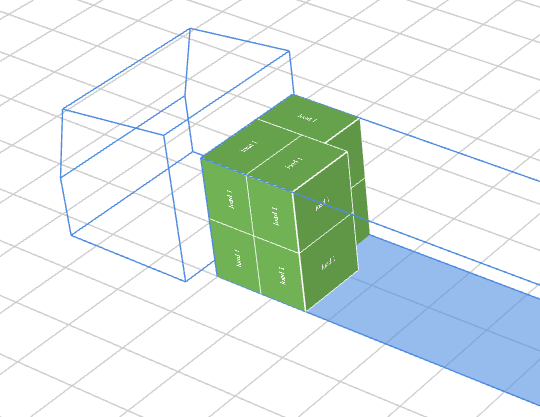
2. Graphical representation for the given example
By default, 6 identical loads were loaded into the default “vehicle” loading space and placed right next to the driver’s cab, starting from the left side.
Extended request with optional values (Request)
All optional data is set by default as described in:
unless the user explicitly provides the desired values.
{
    "loads": [
        {
            "quantity": 6,
            "name": "load 1",
            "length": 120,
            "width": 80,
            "height": 100,
            "weight": 100,
            "priority": 0,
            "stacking": true,
            "allowToRotate": true,
            "rotateFreely": false,
            "alongFloor": false,
            "loadType": 0
        }
],
       "loadingSpaces": [
        {
            "quantity": 1,
            "name": "truck 1",
            "type": "vehicle",
            "parts": [
                {
                    "length": 1300,
                    "width": 200,
                    "height": 200,
                    "limit": 24000,
                    "loadingSide": "back"
                 }
                ]
            }
       ],


        "options": {
            "allowOverweight": false,
            "unit": "cm",
            "keepLoadsTogether": false,
            "newAlgorithm": true,
            "loadingOrder": "default",
            "multiStops": false,
            "arrangeOptimally": false
     }
}
Result
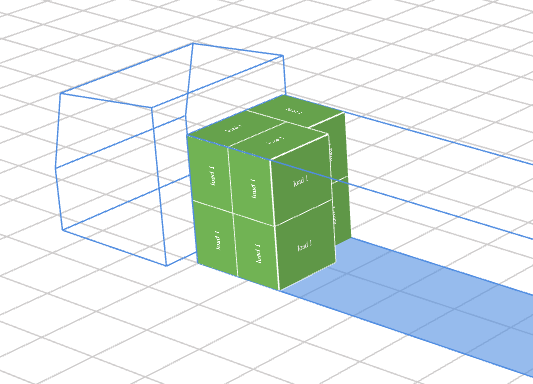
The same arrangement as in the Minimal request (Request) section
.
Response
| HTTP status | Description |
|---|---|
| 200 | The calculation result is returned |
| 400 | Input data validation error |
| 401 | Authorization error |
| 429 | Allowed number of requests exceeded |
Response Body
| Name | Type | Value |
|---|---|---|
| loadingSpaces | array | Array of loading spaces |
| loadingSpace.id | integer | Loading space identifier |
| loadingSpace.name | string | Loading space name. |
| loadingSpace.type | string | Loading space type: “vehicle” “sea” “air x” “air y” “pallet” |
| loadingSpace.parts | array | Array of loading space parts. For example, a road train will consist of two parts. |
| loadingSpace.part.length | number | Length of the loading space part. |
| loadingSpace.part.width | number | Width of the loading space part. |
| loadingSpace.part.height | number | Height of the loading space part. |
| loadingSpace.part.limit | number | Payload capacity of the loading space part. |
| loadingSpace.part.axis | array | Array of axles for the given loading space part. |
| loadingSpace.part.axi.distanceFromSpaceFront | number | Distance of the axle from the front of the given loading space part. |
| loadingSpace.part.axi.emptySpaceLoad | number | Axle load when the loading space is empty. |
| loadingSpace.part.axi.maxLoad | number | Maximum permitted axle load. |
| loadingSpace.part.axi.addedLoad | number | Axle load exerted by the arranged loads. |
| loadingSpace.part.loads | array | Array of loads arranged in the given loading space part (single stop) |
| loadingSpace.part.stops | array | Array of stops |
| loadingSpace.part.stop.stopId | number | Stop identifier |
| loadingSpace.part.stop.name | string | Stop name |
| loadingSpace.part.stop.summary | json | Summary of the data for the given stop |
| loadingSpace.part.stop.summary.occupiedLdm | number | Number of loading meters used |
| loadingSpace.part.stop.summary.freeLdm | number | Number of free loading meters |
| loadingSpace.part.stop.summary.occupiedSurface | number | Occupied area (in sq mm) |
| loadingSpace.part.stop.summary.freeSurface | number | Free area (in sq mm) |
| loadingSpace.part.stop.summary.occupiedVolume | number | Occupied volume (in cubic mm) |
| loadingSpace.part.stop.summary.freeVolume | number | Free volume (in cubic mm) |
| loadingSpace.part.stop.summary.percentLdmUsd | number | Occupied loading meters – as a percentage |
| loadingSpace.part.stop.summary.percentVolumeUsd | number | Occupied volume – as a percentage |
| loadingSpace.part.stop.loads | array | Array of loads for the given stop. |
| loadingSpace.part.load.id | number | Load identifier |
| loadingSpace.part.load.allowToRotate | boolean | Permission to rotate the load around its base |
| loadingSpace.part.load.quantity | integer | Number of loads |
| loadingSpace.part.load.name | string | Load name |
| loadingSpace.part.load.priority | integer | Load priority |
| loadingSpace.part.load.weight | number | Load weight. |
| loadingSpace.part.load.length | number | Load length. |
| loadingSpace.part.load.width | number | Load width. |
| loadingSpace.part.load.height | number | Load height. |
| loadingSpace.part.load.stacking | boolean / integer | Permission to stack the load / number of tiers |
| loadingSpace.part.load.placement | array | Array describing how the loads are arranged within the given loading space part. |
| loadingSpace.part.load.placement.length | number | Length of the placed load. The length and width values may be swapped relative to the original values if the “allowToRotate” option is set to “true”. |
| loadingSpace.part.load.placement.width | number | Width of the placed load. The length and width values may be swapped relative to the original values if the “allowToRotate” option is set to “true”. |
| loadingSpace.part.load.placement.height | number | Height of the placed load. |
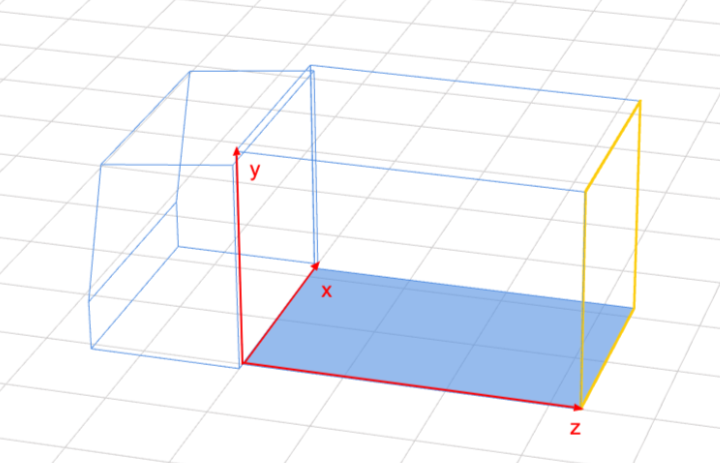
| loadingSpace.part.load.placement.position | json | Position of the load within the loading space, relative to the x, y and z axes. Looking from the front of the space, positions x: 0, y: 0, z: 0 correspond to the bottom right corner of the space. Axis convention used: x: along the width of the space y: along the height of the space z: along the length of the space |
| loadingSpace.part.load.placement.loadsPerAxis | json | Number of loads arranged along each axis |
| loadingSpace.part.load.placement.loadsPerAxis.x | integer | Number of loads along the x axis. |
| loadingSpace.part.load.placement.loadsPerAxis.y | integer | Number of loads along the Y axis. |
| loadingSpace.part.load.placement.loadsPerAxis.z | integer | Number of loads along the Z axis. |
| loadingSpace.part.load.placement.position.x | number | Position of the load on the X axis |
| loadingSpace.part.load.placement.position.y | number | Position of the load on the Y axis |
| loadingSpace.part.load.placement.position.z | number | Position of the load on the Z axis |
| loadingSpace.part.summary | json | Summary for the given loading space part. |
| loadingSpace.part.summary.occupiedLdm | number | Number of loading meters used |
| loadingSpace.part.summary.freeLdm | number | Number of free loading meters |
| loadingSpace.part.summary.occupiedSurface | number | Occupied area (in sq mm) |
| loadingSpace.part.summary.freeSurface | number | Free area (in sq mm) |
| loadingSpace.part.summary.occupiedVolume | number | Occupied volume (in cubic mm) |
| loadingSpace.part.summary.freeVolume | number | Free volume (in cubic mm) |
| notFittedLoads | array | Loads that did not fit into any loading space |
| notFittedLoad.id | number | Identifier of the load that did not fit into the loading space |
| notFittedLoad.length | number | Length of the load that did not fit into the loading space |
| notFittedLoad.width | number | Load width |
| notFittedLoad.height | number | Load height |
| notFittedLoad.weight | number | Load weight |
| notFittedLoad.quantity | integer | Number of loads |
| notFittedLoad.priority | integer | Load priority |
| notFittedLoad.name | string | Load name |
| notFittedLoad.stacking | boolean/ integer | Permission to stack the load / number of tiers |
| notFittedLoad.allowToRotate | boolean | Permission to rotate the load around its base |
| options | json | Algorithm options |
| options.allowOverweight | boolean | Value indicating whether the permitted payload capacity may be exceeded |
| options.unit | string | Unit of the supplied dimensions |
| options.keepLoadsTogether | boolean | Value indicating whether loads from the same group are placed together. |
| _links | array | Array of further possible actions |
| link.rel | string | Relation |
| link.href | string | Link to the project visualization in the Goodloading application |
Response to the minimal request
Response for the request – Minimal request (Request)
Description of the Response parameters, per Response Body
Loads are arranged in the loading space along the x, y and z axes – in the vehicle, starting from the left side of the driver’s cab
There is only 1 exception to the rule above – arrangement using barriers 8. Barriers
Response
{
    "loadingSpaces": [
        {
            "id": 1,
            "name": "truck 1",
            "parts": [
                {
                    "height": 200,
                    "length": 1300,
                    "width": 200,
                    "limit": 24000,
                    "loads": [
                        {
                            "id": 1,
                            "allowToRotate": true,
                            "stacking": true,
                            "name": "load 1",
                            "loadType": 0,
                            "priority": 0,
                            "quantity": 6,
                            "width": 120,
                            "length": 80,
                            "height": 100,
                            "weight": 100,
                            "diameter": 0,
                            "origin": null,
                            "destination": null,
                            "pctSupport": 100,
                            "alongFloor": false,
                            "boxesBelowAllowed": [],
                            "color": 6989903,
                            "placement": [
                                {
                                    "height": 100,
                                    "length": 80,
                                    "width": 120,
                                    "diameter": 0,
                                    "loadsPerAxis": {
                                        "x": 1,
                                        "y": 2,
                                        "z": 1
                                    },
                                    "position": {
                                        "x": 0,
                                        "y": 0,
                                        "z": 0
                                    },
                                    "cubeId": 0
                                },
                                {
                                    "height": 100,
                                    "length": 120,
                                    "width": 80,
                                    "diameter": 0,
                                    "loadsPerAxis": {
                                        "x": 1,
                                        "y": 2,
                                        "z": 1
                                    },
                                    "position": {
                                        "x": 120,
                                        "y": 0,
                                        "z": 0
                                    },
                                    "cubeId": 0
                                },
                                {
                                    "height": 100,
                                    "length": 80,
                                    "width": 120,
                                    "diameter": 0,
                                    "loadsPerAxis": {
                                        "x": 1,
                                        "y": 2,
                                        "z": 1
                                    },
                                    "position": {
                                        "x": 0,
                                        "y": 0,
                                        "z": 80
                                    },
                                    "cubeId": 0
                                }
                            ]
                        }
                    ],
                    "loadingSide": "back",
                    "summary": {
                        "freeLdm": 1140,
                        "occupiedLdm": 160,
                        "freeSurface": 23120000,
                        "occupiedSurface": 2880000,
                        "freeVolume": 462400000000,
                        "occupiedVolume": 57600000000,
                        "percentLdmUsd": 12.307692307692308,
                        "percentVolumeUsd": 11.076923076923077,
                        "totalLoadsWeight": 600
                    },
                    "axis": []
                }
            ],
            "type": "vehicle"
        }
    ],
    "notFittedLoads": [],
    "options": {
        "allowOverweight": false,
        "unit": "cm",
        "keepLoadsTogether": false,
        "newAlgorithm": true,
        "arrangeOptimally": false,
        "loadingOrder": "default",
        "keepGroupsInGivenSpaces": false,
        "isMagnetOn": false,
        "multiStops": false,
        "includeSavedLoadingSpaces": false,
        "additionOrder": true,
        "userOrder": false,
        "volumeOrder": false,
        "weightOrder": false
    },
    "_links": [
        {
            "rel": "preview",
            "href": "https://app.goodloading.com/session?id=e9197db7-acad-4fc7-b58a-f5b26edfdabc&pref=opt-names-opened"
        }
    ]
}
Visualization